 Tuesday, November 17, 2026 Doing the same thing over and over expecting different result is the definition of insanity. It's the epitome of self will and frustrates God's plan for you. If you are ready for your self will to stop working against you, then this podcast is for you! Matthew 16:25
Scott and Teresa Neal, 11/17/2026 | | Monday, November 16, 2026 Why are you so hard on yourself? Being PErfeCt isn't possible but doing your best is! Today we want to remind you that not only is God's grace your greatest gift but the best relief from the unrealistic expectations you put on yourself and on others to be perfect. Romans 12:1-5 and Micah 6:6-8 Scott and Teresa Neal, 11/16/2026 | | Friday, November 13, 2026 You have the power available to you to overcome any of life’s challenges when you are a child of God! You are NOT a victim of life's circumstances unless you choose to see yourself as one. Today we discuss how with God's power and a change in your thinking, you can begin again better than before and keep moving forward.
Romans 8:28 Scott and Teresa Neal, 11/13/2026 | | Thursday, November 12, 2026 We can sense thoughts others have towards us and they can sense ours towards too. It all stems from the thoughts in our hearts. So today lets turn from judging others on their outward appearance, to seeing and appreciating who they are on the inside. Remember people and things are not always as they seem. Luke 9:28-36
Scott and Teresa Neal, 11/12/2026 |
|
Are you having to trust God now like never before? If so, this time can be the greatest adventure of your life!
Before things went awry in my life, God had given me a vision for a new future. It didn't make sense and it seemed impossible but He knew t |
|
|
|
|
 Quick Start Guide - Tricks and Tips
This quick start guide covers some of the less well known aspects of the website to help you get more out of it!
My Membership
|
My Membership allows you to apply for membership of groups on the website.
To access the My Membership area hover over the My Area option and several sub-options, including My Involvement, will be displayed. Hover over My Involvement and then click on the My Membership option.
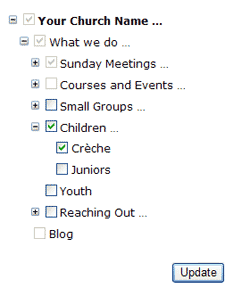
To apply for membership check the boxes next to each group you are a member of within your organisation.
Once you have selected the appropriate groups, click the update button. An administrator of that group will then either approve or decline your application.
|
 |
Rota Reminders
|

|
|
The rota reminders feature helps you keep track of when you are next on duty! Whether you're on PA setup, Children's work or Tea & Coffee making, email reminders can make sure you know about an upcoming event well in advance.
By default, 3 days before an event where you are involved you will receive an email telling you the event you are involved in, the duty you are performing and a contact person should you have any questions.
To change these settings hover over my area and then the my involvement option on the menu bar and select my reminders.
Under the my reminders section your current settings are displayed:
- If you would like to turn reminders off uncheck the box and press update.
- If you would like to receive your rota reminders on a different day select a new setting by clicking on the arrow next to the number. (Choosing 0 days will send you a reminder on the morning of the day of the event). Press the update button to save your changes.
|
Printable Address Book
|
|
|
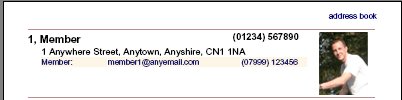
You can download the church address book in Adobe PDF format to print out and keep by the telephone. Click the Printable Version link at the top of the page and select from the range of formats available before clicking the download button. Note: you will need to install Adobe Acrobat Reader in order to open these files.
|
Download the Address Book to Outlook or Outlook Express
|
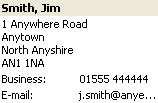 You can download the entire online address book for your church into Microsoft® Outlook, Outlook Express or another email client as follows:
- Click on the
 address book option from the home menu.
- The church address book will be displayed. Click on the Advanced Options link at the top of the page to display the additional options.
- Click on the arrow next to Choose format and select Export to file:
- Click on the All link.
A link to the address book in a text format will be displayed along with instructions on how to download and install the file.
You can also use advanced options for more display options.
|
Send Birthday Greetings to Other Members
|
You can send a personal message to another member on their birthday as follows:
- Select the
 calendar option from the home menu.
- Click on the arrow next to show calendar and select show birthdays.
- A list of birthdays for the current month will be displayed – the current date is highlighted.
- Click on the member you wish to send birthday greetings to (bear in mind that the greeting will be sent immediately).
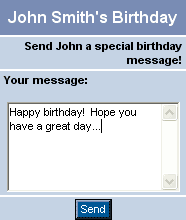
- A window will open with the member name at the top and a space to enter your greeting.
Once the greeting is complete click the Send button.
|
|
Parental Lock
|
 Childlock gives parents the ability to prevent children in your family from altering certain settings in the my profile area. When childlock is enabled any child under 16 in the same family will no longer be able to edit the profile of any other member of your family, and they will not be able to alter the privacy settings or date of birth options in their own profile.
A valid date of birth must be entered for all members of the family in order to successfully use the childlock feature.
You can enable the childlock from the family details section of my profile (found under the my area menu). By default this facility is switched off.
|
|
|
|
| |
|



