Quick Start Guide - Forums
 The discussion forums are a great place to interact with the rest of your church community - whether it’s thrashing out difficult theological issues, alerting people to community needs, or just chatting about the performance of the church football team! The discussion forums are a great place to interact with the rest of your church community - whether it’s thrashing out difficult theological issues, alerting people to community needs, or just chatting about the performance of the church football team!
What is a forum?
A forum is a discussion area – each area caters for a different topic of discussion such as debate, prayer requests, community needs, or general chat. Each forum has a number of topics making up the threads of conversation – for instance, a request for a babysitter would be a topic in the community needs forum with each response a posting inside that topic.
Forums may be associated with a particular group within the church – so for instance you may have a forum specifically for members of the worship team. Some forums are generally available to any visitor (e.g. guestbook), some for members of the church (e.g. chat), whilst some may only be available to members of a small group.
Discussion forums on the home page
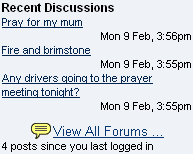 The home page of the church web site has a small selection of the most recent contributions to the forums and feedback to articles. Click on any link to display the full posting as well as read the rest of the discussion. Click on the View All Forums link to display the forums page. The home page of the church web site has a small selection of the most recent contributions to the forums and feedback to articles. Click on any link to display the full posting as well as read the rest of the discussion. Click on the View All Forums link to display the forums page.
You can also access the forums by selecting the forums option from the home menu.
The Forums page
The forums page displays a complete list of all the forums available to you (note: if you are not logged on at this stage you will only see the forums available to visitors).

A “new” flag next to the forum name indicates that there have been further contributions to this forum since you last logged in. Click on the forum name to see a list of topics within that forum.
The Topics page
The topics page displays all the conversation threads within a forum. At the top of the page is a brief introduction as well as information on who can see contributions to this forum. A “new” flag next to the topic name indicates that there have been further contributions to this topic since you last logged in.

Click on the name of the topic you would like to read.
The opening contribution to the topic is displayed at the top of the page; each response is listed chronologically beneath. If you have visited this topic previously the responses will be divided into those you have read before and those that are new contributions since you last logged in.
Click on the All forums link at any time to return to the forums page. Click on the Topic list link to return to the topics page from inside any topic.
Adding your message to a topic
To add your response either click the Write a reply link or scroll to the bottom of the page and add your comment in the box provided. If you would like to add an ‘emoticon’ (an animated face conveying an expression) click on the smiling face to select one of the available icons. Once you have completed your response click the OK button.
Note: If you have a member account on the web site you should ensure that you are logged in before submitting a new message to the forums. If you do not have a member account you may still be able to submit a response in some forums – remember to add your name to the appropriate box before pressing the OK button.
Starting a new topic
You can start a new topic as follows:
- Enter the discussion forum where you wish to post the message using the method described above.
- At the bottom of that area is a section called Start a new discussion topic; type your message into the box provided – don’t forget to add a descriptive title which describes the message content.
If you would like to add an emoticon click on the 'smiley' face to select from the icons available.
-
Once you have completed your message click the OK button to submit it to the forum.
Offensive messages
There may be occasions when a visitor (or member) posts a message which you feel is either inappropriate or offensive. If you notice a message of this nature click the  flag at the top of that message to report the posting to a forum moderator. The message will be immediately removed and will only be reinstated when the moderator has approved or edited it. flag at the top of that message to report the posting to a forum moderator. The message will be immediately removed and will only be reinstated when the moderator has approved or edited it.
|




